Listeo Admin – Quick Featured / Verified Toggles for Listings
Adds admin controls to mark Listeo listings as Featured or Verified in three ways: one-click colored buttons in a new column on the listings screen, a Bulk Actions dropdown (Make/Remove Featured, Verify/Unverify), and Yes/No fields in the inline Bulk Edit panel. Toggles the _featured and _verified meta, is capability- and nonce-protected, and lives entirely in the theme functions.php (no listeo-core changes).
kr0.00
Verze 1.0.0
Aktualizováno 7. října 2026
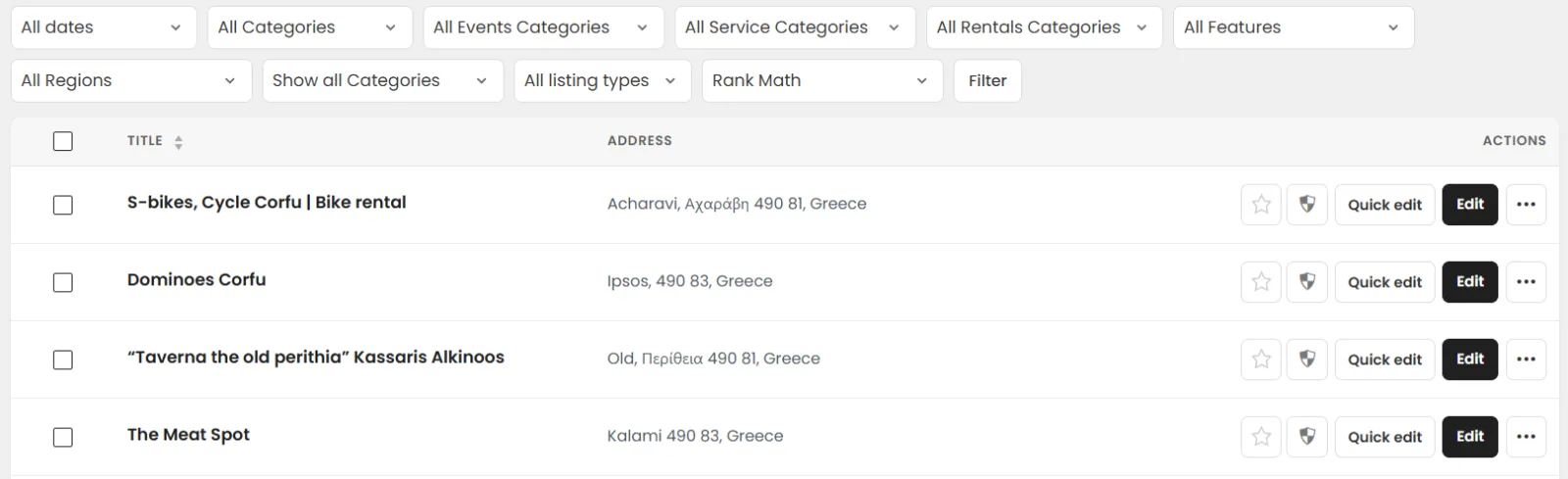
This code adds admin-side controls to manage two listing properties — Featured (_featured meta) and Verified (_verified meta) — directly from the WordPress listings management screen (post_type=listing), without modifying the listeo-core plugin. Everything lives in the theme's functions.php.
It provides three independent ways to set these flags:
- Per-listing quick toggle buttons (a new column)
- Adds a "Featured / Verified" column to the listings list table, placed right before the existing Actions column.
- Each row shows two styled pill buttons:
- ⭐ Featured — gold when active ("Featured"), grey when inactive ("Make Featured").
- 🛡 Verified — green when active ("Verified"), grey when inactive ("Verify").
- Clicking a button toggles the corresponding meta value via a nonce-protected admin_init handler, then redirects back to a clean listings screen.
- A small CSS block (loaded only on the listings list screen via admin_head-edit.php) styles the buttons with dashicons, colors, fixed width, and hover effects.
- Bulk actions dropdown
- Adds four entries to the Bulk actions dropdown: Make Featured, Remove Featured, Verify, Unverify.
- Select multiple listings → choose an action → Apply. The handle_bulk_actions-edit-listing handler updates each selected listing's meta and shows a success admin notice with the count.
- Inline Bulk Edit panel fields
- Adds two — No Change — / Yes / No dropdowns (Featured and Verified) to the inline Bulk Edit panel (Bulk actions → Edit).
- "No Change" leaves each listing untouched; "Yes/No" sets the meta for all selected listings. Saved through save_post_listing during a bulk-edit submission.
Detaily produktu
Stručný přehled
Adds admin controls to mark Listeo listings as Featured or Verified in three ways: one-click colored buttons in a new column on the listings screen, a Bulk Actions dropdown (Make/Remove Featured, Verify/Unverify), and Yes/No fields in the inline Bulk Edit panel. Toggles the _featured and _verified meta, is capability- and nonce-protected, and lives entirely in the theme functions.php (no listeo-core changes).
Podpora a aktualizace
Changelog will be published with the next release.
Sign in to leave a review.
Zatím žádné recenze. Buďte první!